Your 1099 arrived, and it says you made more than you remember seeing in your bank account. You didn't miscount your deposits — the form is reporting the full fare, including the platform's own commission and fees, and your bank only ever saw what was left after they took their cut. Report the smaller number because it feels honest and you've just created a mismatch that produces a letter from the IRS. Report the number on the form and deduct the fees, and you land on the same tax with a return the platform's own computer can match.
That one gap — between what a platform reports and what you actually need to report — is the reason most gig-worker templates get the math wrong before they even reach mileage.
Who this is for
Rideshare and delivery drivers on any number of platforms, filing as self-employed on the income. If you drive for one platform and take its numbers at face value, this catches the mismatch before it becomes a letter. If you drive for two or three at once, it catches something worse: the platforms' mileage figures don't just undercount individually, they double-count when you add them together.
What actually costs drivers money — with real numbers
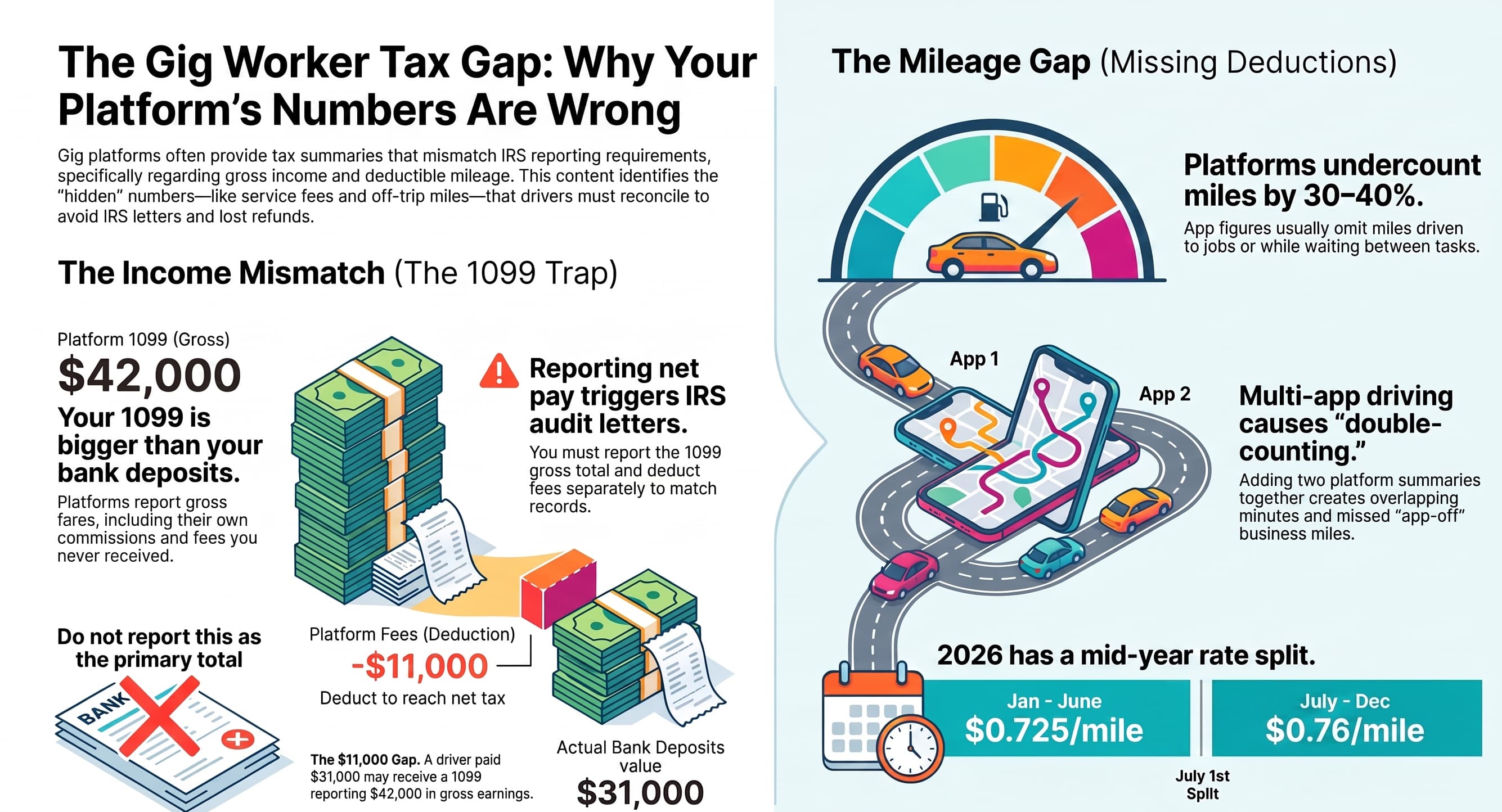
The 1099 is bigger than what you were paid. Platforms report the gross fare including their own commission and service fees, so a driver paid $31,000 can receive a form saying $42,000. Reporting the smaller number is what produces the IRS letter. Report the gross and deduct the fees — same tax, arrived at the way the platform's own computer can match it.
Your platform's mileage figure is too low. It reports on-trip miles. Driving to where the work is, waiting between jobs, and moving from one job to the next are all deductible too, and none of them are in that number. Independent estimates put the gap at roughly 30–40% more than the platform's own figure — a sanity check for your own log, not a number you can deduct on its own. Multi-app drivers have it worse: two platforms' summaries added together typically both overcount (the same minutes measured twice) and undercount (miles with the app off but still for the business) at the same time.
One mileage rate for a year that had two. $0.725 a mile through June 30, $0.76 from July 1. On 25,000 miles split across the change, the correct deduction is $18,562. A template using the old rate all year gives $18,125; one using the new rate gives $19,000 — several hundred dollars either way, from a date comparison most templates don't make.
The vehicle decision that locks. Standard mileage or actual expenses is chosen in the first year you use the car for the business, and claiming actual expenses that first year closes off the standard rate for that vehicle permanently. Guessing wrong here isn't a one-year mistake — it's locked in.
What's in the workbook
- Dashboard — earnings, miles, and what an hour is actually worth after fees and fuel
- Shifts — hours and miles, each valued at the mileage rate for its own date
- Payouts — gross, fees, and net per statement, reconciled against each other so a mismatch shows up before the IRS finds it
- Vehicle — both the standard-mileage and actual-expense methods worked out side by side from your odometer readings, with the lock-in stated plainly
- Schedule C Organizer, Tax set-aside with the tips deduction, and Rates 2026
- For your preparer — what to print, in what order
Why this one and not a free template you already found
Every rate and threshold comes from the same constants file the free calculators on this site read — the same logic behind the Gig Worker Calculator. It reconciles what the platform paid against what it reported, rather than trusting either number alone, and it reads the date on each shift to apply the mileage rate that actually applied that day. Every release goes through a structural check, tax-regression tests, and a full recalculation of every formula — an early version of this exact kit had an example mileage entry silently apply the wrong half-year rate, caught only because the whole workbook was actually recalculated rather than just checked for formula syntax.
It doesn't cover W-2 employees, inventory and cost of goods sold, the home-office deduction, depreciation schedules, the QBI deduction, partnerships or S corporations, or state and local tax. It's an organizing and reconciliation tool, not a substitute for a preparer.
Where to start
The platform's own mileage summary and your real deduction are rarely the same number — it undercounts the driving between drop-offs and pickups that never shows up as an active trip. That gap is the exact problem the Shifts and Vehicle sheets are built to solve.
The kit is free while it's in beta: every formula has been machine-evaluated and every tax figure regression tested, but the layout and print setup have been checked in code and not yet by a person with Excel open. Get the Gig Worker Tax Kit →
Frequently Asked Questions
I only drive for one platform. Is the reconciliation sheet still useful?
Yes — the gross-versus-net mismatch happens on a single platform too, since every platform reports the full fare and deducts its fees before paying out. Multi-platform driving adds the mileage double-counting problem on top of it, but the payout reconciliation matters either way.
Does this replace the app's own mileage tracking?
No, and it isn't meant to. Use whatever tracking gets you an accurate log — the app, a separate mileage app, or manual entries — and bring the results into the Shifts sheet, which applies the correct rate per date and reconciles it against your vehicle-method choice.
What if I already claimed actual expenses in a prior year?
Then the standard-mileage rate is closed to you for that vehicle permanently, by the lock-in rule above. The Vehicle sheet still works out actual expenses for you going forward; it just won't offer the standard-mileage comparison as a live option for that car.